
Does Your Business Need Backup or Failover Internet?
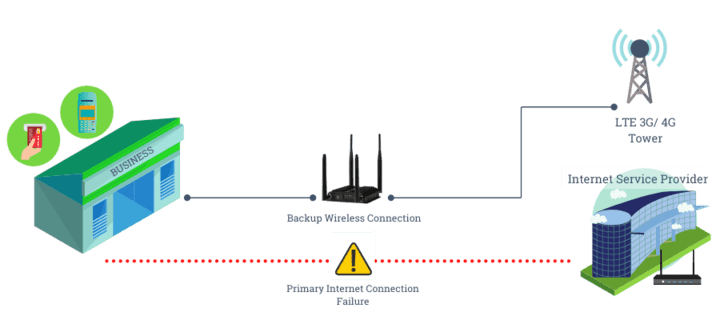
Most businesses in today’s advanced world breathe and live on the internet. Ranging from doing minute tasks to the most tiresome, the empires of various business people thrive with a secure and fast internet connection. But why is it so important to have a backup/failover Internet? Companies going head-to-head in various niches depend on digital efficiency in bringing in most of their income and staying on top. The competitive nature of these big businesses is a force to be reckoned with. Hence, having a failover Internet line could save you money, build loyal customers since you’re always quick and on time with their demands, and eliminate downtime for complete productivity. But can you imagine what happens when a big-shot company loses its connection for even an hour? You lose the trust of customers who expects quick results from you, and failure to provide this simple yet agonizing function could lead to abnormal losses. We’re talking in the thousands or even millions of dollars. So if you’re wondering about the importance of a backup/failover internet connection and pondering if you need such a thing, then the answer is a big yes! You can easily avoid this obstacle by simply having a secondary connection, also known as backup/failover internet. Start protecting your business today and always stay on top of the game. This article covers everything you need to know and understand about backup/failover internet for your growing business. Let’s get started! What Is Backup Internet? The perfect solution for an internet outage is to have a backup Internet line. Businesses thrive on continuity, and the Internet plays a significant part in making this possible. In simple words, backup internet is a safety net if you’re met with an internet outage on your main connection. Even if you could find the perfect service provider for your company that provides almost 100% uptime, there will always be instances when the connection goes down for a period of time due to some unforeseen event. Your company could cause the issue by accidentally disconnecting the connection or by an unexpected error on your service provider’s part due to natural disasters like tornadoes, which are risks you shouldn’t be taking. Outages pose an extreme threat to your thriving businesses. Depending on what is causing the issue, it could take minutes to hours, or even days to get it back up, resulting in downtime costing you thousands of dollars and even millions. In the meantime, productivity goes down the drain, and wasting even minutes is crucial when playing at a high-level competitive stage. In the worst-case scenario, your competition could be getting your customers. You can prevent this by having a secondary connection or backup Internet line if your company relies on the internet. The failover or backup Internet line would kick in as soon as your main line goes down during an outage. The failover Internet gets connected as soon as your primary connection cuts off, ensuring you don’t lose productivity, time, and money. It’s important to understand how beneficial it can be for your business to have a second connection it can rely on during a time of need. Cost Of Downtime What is downtime? Downtime is when you cannot work as a company due to malfunctioning machines, technical failures, or in this case, an outage of the Internet. You lose time, reputation, productivity, and money, among many other things, as a company during downtime. Nowadays, every company and business is linked to the Internet in some form or another. If your business falls into this category, the cost of downtime is not to be taken lightly. Since you need the Internet to interact with customers, utilize email, and any web-based applications, it’s important to ensure downtime doesn’t affect your business and staff. There are also cases where your company’s phones are connected to the internet, so having an outage can lead to phone service downtime since your customers would not be able to reach you which can lead to losses. Here are some of the general costs of downtime: Hidden costs – These are the extra expenses caused by the outage, including paying the repair man his rate and completing orders set by the customers, among other things. Some more hidden costs include building bills like (security, AC, lights, etc.) during a loss. Loss of sales – An outage can impact your company’s ability to make sales, causing losses of potential and current customers. Owing money – An hour of downtime could lead to various unhappy customers and situations where they would want to be compensated for their time and money wastage by the company. A damaged reputation – Reputation is a long work in progress and can easily be destroyed in as short as an hour or two. Always being prepared to save the company’s reputation is critical to success. Productivity of stuff – You’re paying your staff to be productive, but since they need the internet connection and you happen to have an outage, you will still end up paying them for hours spent in the office doing nothing. Some of the world’s biggest companies, like Amazon, sometimes face outages. However, for a billion-dollar company to dish out a few million dollars lost in hours is less harsh than for small companies. Start-ups and small companies usually have more to lose than big ones since you spend more than you earn, your start-up reputation is on the line, customer trust is still in progress, and you might risk tragic losses with all the additional costs. Having a safety net to rely on by paying a few additional costs for a secondary Internet will save you more money than you would spend in case of downtime. Besides, an outage is a frequent phenomenon that occurs to the best of businesses, and you can’t just risk the company you’ve worked so hard for to face such a scenario. Things That May Cause Downtime/Internet Service To Fail While a variety of situations can end
Does Your Business Need Backup or Failover Internet? Read More »